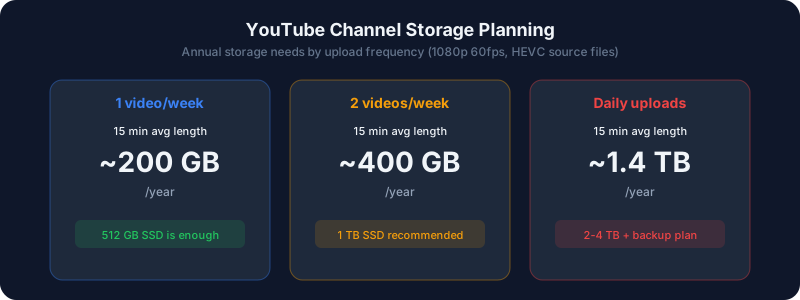
Starting a YouTube channel? One of the most overlooked parts of content creation is storage planning. Running out of disk space mid-edit is frustrating, and losing footage to a full drive is devastating.
This guide helps you estimate exactly how much storage your channel needs based on your recording settings, upload schedule, and editing workflow, using real file-size math you can plan around.
Quick Answer
Most weekly YouTubers filming in 1080p need 1–2 TB for their first year; 4K creators should budget 2–4 TB, and daily uploaders anywhere from 4 TB up. The three variables that decide everything are resolution, how often you post, and how much source footage you keep versus delete.The Math Behind Video File Sizes
Storage comes down to one formula: file size equals bitrate multiplied by duration. A one-hour clip at a bitrate of 50 Mbps (megabits per second) works out to roughly 22 GB, because you divide by 8 to convert bits to bytes, then multiply by 3,600 seconds. Camera footage is usually recorded at a much higher bitrate than the video you eventually upload, which is why source files feel so large.
Here are realistic per-minute source-footage sizes for common capture settings:
| Recording Setting | Approx. Bitrate | Size per Minute | Size per Hour |
| 1080p 30fps (H.264) | ~35 Mbps | ~260 MB | ~15.5 GB |
| 1080p 60fps (H.264) | ~50 Mbps | ~375 MB | ~22 GB |
| 4K 30fps (H.264) | ~100 Mbps | ~750 MB | ~44 GB |
| 4K 60fps (H.264) | ~150 Mbps | ~1.1 GB | ~66 GB |
| 4K 30fps (ProRes 422) | ~490 Mbps | ~3.7 GB | ~220 GB |
Monthly Storage by Upload Schedule
Filming rarely produces just one usable take. Most creators shoot two to four times more raw footage than the finished video length. The table below assumes a 3:1 shooting ratio (three minutes recorded per finished minute) plus editing overhead of roughly 50% for exports, proxies, and project caches.
| Upload Schedule | Resolution | Finished Length | Est. Monthly Storage |
| 1 video/week | 1080p 30fps | 15 min | ~30–45 GB |
| 1 video/week | 1080p 60fps | 15 min | ~45–65 GB |
| 1 video/week | 4K 30fps | 15 min | ~90–130 GB |
| 3 videos/week | 1080p 30fps | 10 min | ~60–90 GB |
| 3 videos/week | 4K 30fps | 10 min | ~180–260 GB |
| Daily uploads | 1080p 60fps | 20 min | ~350–500 GB |
| Daily uploads | 4K 60fps | 20 min | ~1.0–1.5 TB |
Storage by Channel Type
Talking-Head and Tutorial Channels
Low-motion content such as tutorials, talking-head videos, and podcasts compresses efficiently. 1080p 30fps with H.264 is plenty, and screen recordings often use even less. Budget 500 GB–1 TB for your first year of weekly uploads.
Gaming Channels
Game footage contains fast motion and particle effects that demand higher bitrates, and sessions are long. Record at 1080p 60fps minimum. Budget 1–2 TB for weekly uploads, and more if you keep full multi-hour capture sessions rather than trimmed highlights.
Cinematic and Travel Vlog Channels
High-quality B-roll and color-grading workflows push creators toward 4K recording, often in ProRes or high-bitrate HEVC. A single day of travel shooting can fill hundreds of gigabytes. Budget 2–4 TB minimum for the first year, plus fast working storage.
Daily Vloggers
Volume is the real challenge here. Even at 1080p, daily 15–30 minute videos add up quickly, and there is no downtime to catch up on archiving. Budget 2–4 TB for one year of source footage, plus a matching amount for backups.
The 3-2-1 Backup Rule for YouTubers
Your footage is the raw material of your business. Protect it with the 3-2-1 strategy:
- 3 copies of every important file
- 2 different storage types (for example, an SSD and an HDD)
- 1 copy offsite (cloud backup or a drive stored in another location)
At minimum, keep source footage on your editing drive plus one external backup. Once a video is published and you are confident you will not need to re-edit it, archive the source to cheaper HDD storage and free up your fast SSD for the next project.
Recommended Storage Setup by Budget
Starter
- 1 TB NVMe SSD for editing
- 2 TB external HDD for backups
- Handles 1080p weekly uploads for one to two years
Mid-Range
- 2 TB NVMe SSD for editing
- 4 TB external SSD for backup and archive
- Handles 4K weekly uploads for one to two years
Professional
- 4 TB NVMe SSD for active editing
- A 4-bay NAS running RAID 5 (four 4 TB drives = ~12 TB usable) for archive and redundancy
- Cloud backup subscription for the offsite copy
- Handles daily 4K uploads for two-plus years
Ways to Cut Your Storage Bill
- Delete unused takes weekly. The single biggest saving. Once a video ships, most raw footage will never be touched again.
- Record in HEVC where your camera allows it. It roughly halves file size versus H.264 at the same quality.
- Use proxies for 4K editing. Edit against small proxy files and relink to the originals only at export time.
- Match your export to the upload target. YouTube re-encodes everything, so exporting a 4K video at a reasonable bitrate rather than a massive one saves space with no visible quality loss. Estimate export sizes with the upload time calculator.
Bottom Line
Storage planning is just multiplication once you know your bitrate. Pick your resolution and posting cadence, run the numbers, then add headroom for backups and a shooting ratio above 1:1. A weekly 1080p creator is comfortable on 1–2 TB; a daily 4K channel should plan for multiple terabytes and a proper NAS.
For exact figures based on your codec and settings, use the disk space planner or the recording time calculator, and see the companion breakdown in 4K streaming storage requirements.