4K video production generates enormous files. Whether you're a YouTuber, filmmaker, or live streamer saving VODs, understanding your storage requirements before a shoot prevents the nightmare of running out of space mid-session.
This guide breaks down exactly how much storage 4K video needs across every common codec, frame rate, and recording duration, with real numbers you can plan around.
Quick Answer
One hour of 4K 60fps footage runs from about 15 GB in AV1 to over 100 GB in ProRes 422. For delivery codecs (H.264/HEVC), budget roughly 15–30 GB per hour at 30fps; for editing codecs like ProRes, budget several times that.The Math Behind 4K File Sizes
Every file size traces back to one equation: bitrate multiplied by duration. Divide the bitrate in megabits per second by 8 to get megabytes per second, then multiply by the number of seconds. A 4K clip encoded at 34 Mbps for one hour therefore lands near 15 GB (34 ÷ 8 × 3,600 ÷ 1,000). Higher frame rates roughly double the data rate, and editing codecs use far higher bitrates than streaming codecs to stay easy to scrub.
4K File Sizes at a Glance
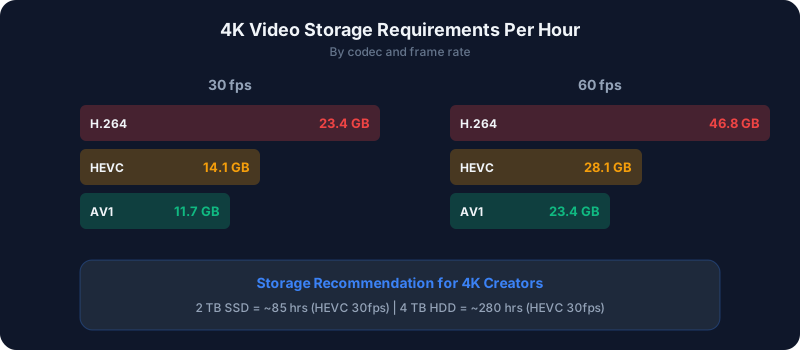
Here's how much storage one hour of 4K (3840×2160) video consumes at typical bitrates, including a 128 Kbps audio track:
| Codec | 30fps (1 hour) | 60fps (1 hour) | Typical Bitrate |
| AV1 | ~7.7 GB | ~15.3 GB | ~17–34 Mbps |
| HEVC (H.265) | ~9.2 GB | ~18.3 GB | ~20–41 Mbps |
| H.264 (AVC) | ~15.3 GB | ~30.5 GB | ~34–68 Mbps |
| ProRes 422 | ~53.5 GB | ~107.0 GB | ~119–238 Mbps |
| ProRes 4444 | ~76.4 GB | ~152.8 GB | ~170–340 Mbps |
Storage Planning by Content Type
YouTube Content Creators
If you record in 4K and edit before uploading, account for four things:
- Source footage — the raw recordings, and the largest files
- Project files — your editor's working data, usually 10–20% of source
- Render and export — the final upload file
- Backup — at least one copy of the source
A 15-minute finished video shot in 4K 30fps H.264 generates roughly 3.8 GB of source per clean take, but with a realistic 3:1 shooting ratio you'll capture closer to 11 GB. Add editing overhead and a safety margin, and you should budget about 15–25 GB per finished video.
For a weekly 4K upload schedule, that's roughly 60–100 GB per month in source files. Over a year, plan for around 1 TB, so a 2 TB drive gives comfortable headroom.
Live Streamers Recording VODs
If you stream four to six hours daily and save local recordings, storage adds up fast:
- 4K 30fps H.264, 5 hours/day: ~76 GB/day → ~2.3 TB/month
- 4K 30fps HEVC, 5 hours/day: ~46 GB/day → ~1.4 TB/month
- 1080p 60fps H.264, 5 hours/day: ~110 GB/day → ~3.3 TB/month at high local bitrates, far less if you cap the recording bitrate
Most streamers record VODs in HEVC or cap the local recording bitrate well below source quality to keep storage manageable. Recording locally at 1080p60 while reserving 4K only for edited uploads avoids massive VOD archives entirely. See the OBS recording settings guide for lean capture presets.
Professional Video Production
Professional workflows built on ProRes need far more room. An eight-hour shooting day in 4K ProRes 422 generates roughly 428 GB; in ProRes 4444 that climbs to about 611 GB per day. Multiply across a multi-camera shoot and a single project can span terabytes. Production houses typically run RAID arrays or NAS systems with 20–100 TB of usable capacity.
Best Storage Solutions for 4K Video
Internal SSDs (Editing)
For active editing, NVMe SSDs deliver the sustained throughput needed for smooth 4K timeline playback. A 2 TB NVMe drive dedicated to editing, separate from your OS drive, is a sensible minimum.
External SSDs (Field Recording)
For on-location shoots, rugged portable SSDs offer the fast, consistent write speeds 4K capture demands in a pocketable form factor. A 4 TB model holds a full day of high-bitrate 4K recording.
NAS Systems (Archive)
For long-term storage and backup, a network-attached storage unit with four or more drive bays running RAID 5 or RAID 6 provides both capacity and redundancy. A 4-bay NAS with 8 TB drives yields roughly 24 TB usable in RAID 5, surviving a single drive failure without data loss.
How Codec Choice Affects Storage
Codec choice is the single biggest lever on file size. Relative to an H.264 baseline:
- HEVC (H.265): about 40% smaller — the best all-round balance of quality, compatibility, and size
- AV1: about 50% smaller — best compression, but the slowest to encode and needs newer hardware
- ProRes 422: roughly 3.5× larger — for professional editing only
- ProRes 4444: roughly 5× larger — for VFX and compositing workflows that need an alpha channel
For most creators, recording in HEVC offers the best tradeoff. Modern GPUs from NVIDIA and AMD, plus Apple Silicon, all support hardware HEVC encoding with minimal quality loss. If you need to squeeze existing files smaller, the compression calculator shows the savings before you re-encode.
Bottom Line
4K storage planning is just bitrate times duration, then multiplied by your shooting ratio and backup copies. Delivery codecs keep an hour under 30 GB; editing codecs like ProRes demand many times more. Choose HEVC for a strong quality-to-size balance, budget for backups, and size your drives to the workflow rather than a single project.
Estimate your exact numbers with the disk space planner, compare codecs on the codec comparison page, or plan a full channel in how much storage for a YouTube channel.