Choosing the right video codec affects everything: your file sizes, stream quality, upload times, and whether your viewers can actually play your content. With three major codecs competing in 2026 — H.264, HEVC (H.265), and AV1 — the decision isn't always straightforward.
Quick Answer
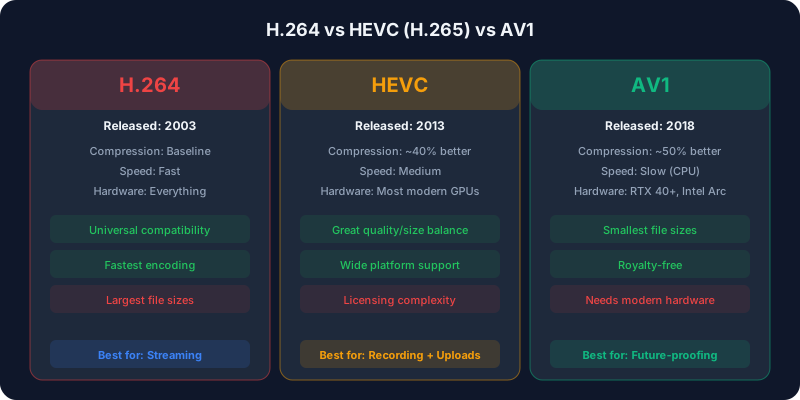
Use H.264 for maximum compatibility and live streaming, HEVC for 4K recording and Apple workflows, and AV1 for web delivery and future-proofing. H.264 plays everywhere; HEVC is ~40% smaller; AV1 is ~50% smaller and royalty-free but needs recent hardware to encode fast. This guide compares all three across every metric that matters.Quick Comparison Table
| Feature | H.264 (AVC) | H.265 (HEVC) | AV1 |
| Compression efficiency | Baseline | ~40% better | ~50% better |
| Encoding speed | Fast | Moderate | Slow (software), Fast (hardware) |
| Hardware decode support | Universal | Most modern devices | 2022+ devices |
| Browser support | All browsers | Safari, Edge, partial Chrome | Chrome, Firefox, Edge, Safari 17+ |
| Licensing | Licensed (free for end users) | Complex licensing | Royalty-free |
| Best for | Maximum compatibility | 4K content, Apple ecosystem | Web delivery, future-proofing |
What a codec actually does
A codec is the algorithm that compresses raw video into a manageable file, then decompresses it for playback. Newer codecs are smarter about finding redundancy between frames, so they hit the same visual quality at a lower bitrate — which means smaller files and lower bandwidth. The tradeoff is that smarter compression takes more processing power to encode, and older devices may not have the hardware to decode it.
That tension — efficiency versus compatibility versus encoding cost — is the whole story behind choosing between these three.
H.264 (AVC): The Universal Standard
H.264 has been the dominant video codec for over 15 years. It's supported on virtually every device, browser, and platform ever made. When in doubt, H.264 works.
Strengths
- Universal hardware decoding on essentially every device from the last decade
- Fastest encoding of the three, ideal for real-time streaming on modest hardware
- Accepted by every streaming platform without exception
- Mature ecosystem of tools, encoders, and documentation
Weaknesses
- Largest file sizes — uses roughly 40–50% more space than modern codecs
- Less efficient at 4K and higher resolutions
- Showing its age in quality-per-bit versus newer options
When to Use H.264
Choose H.264 when compatibility is your top priority: live streaming to Twitch and other platforms, encoding for older devices, or when you need the fastest encode with limited hardware. It remains the safest default for live RTMP streaming, which is why it anchors most best-codec-for-live-streaming recommendations.
H.265 / HEVC: The Efficiency Upgrade
HEVC (High Efficiency Video Coding) delivers substantially better compression than H.264 — roughly 40% smaller files at equivalent quality. It's the default codec for 4K content on Apple devices and many smart TVs.
Strengths
- ~40% better compression than H.264
- Excellent hardware support on modern GPUs (NVIDIA, AMD, Apple Silicon)
- Native support on iOS, macOS, Apple TV, and most smart TVs
- Proven and mature, widely deployed since 2017
Weaknesses
- Complex, fragmented, and expensive licensing
- Limited browser support (no native Chrome support on Windows/Linux)
- Slower software encoding than H.264
When to Use HEVC
HEVC shines for 4K recording and local storage where file size matters. It's the best choice for Apple-centric workflows, camera recordings, and any situation where you control the playback device. Avoid it for web-only delivery because of browser gaps. If you record locally, see our OBS recording settings guide for HEVC setup.
AV1: The Future of Video
AV1 is the newest major codec, developed by the Alliance for Open Media (AOMedia) — whose members include Google, Apple, Netflix, Amazon, and Meta. It's royalty-free and offers the best compression available.
Strengths
- Best compression efficiency — around 50% smaller than H.264
- Completely royalty-free and open standard
- Strong browser support (Chrome, Firefox, Edge, Safari 17+)
- Adopted by YouTube, Netflix, and other major platforms
- Hardware encoding on RTX 40/50-series and Intel Arc GPUs
Weaknesses
- Software encoding is very slow (several times slower than H.264)
- Hardware decoding requires recent devices (roughly 2022 or newer)
- Smaller tooling ecosystem than H.264/HEVC
When to Use AV1
AV1 is the best choice for web delivery in 2026. If your content is mainly viewed in browsers (YouTube, web embeds), AV1 gives the best quality at the lowest bitrate and cuts CDN costs thanks to smaller files. For live streaming, use AV1 only with hardware encoding (RTX 40-series or newer, or Intel Arc). Our NVENC AV1 explainer covers real-time AV1 in detail, and VP9 vs AV1 compares it to Google's older open codec.
Encoding: hardware vs software
The efficiency numbers above assume good software encoding, which is slow — a real problem for AV1. Hardware encoders (NVENC, AMD AMF, Intel QuickSync) fix the speed problem but trade a little quality per bit for enormous speed gains. For live streaming, hardware encoding is almost always the right call because it offloads work from your CPU and keeps your game running smoothly. For offline archival where time doesn't matter, software encoding squeezes out the best quality at a given file size. See NVENC vs x264 for the streaming tradeoffs.
File Size Comparison: Real Numbers
Here's how a 1-hour 1080p 60fps video compares across codecs at typical high-quality bitrates:
- H.264: ~7.1 GB
- HEVC: ~4.2 GB (about 41% smaller)
- AV1: ~3.5 GB (about 51% smaller)
At 4K 30fps, the gap widens:
- H.264: ~15.3 GB
- HEVC: ~9.2 GB
- AV1: ~7.7 GB
Run exact numbers for any resolution and codec with our compression calculator or the full codec comparison.
The Verdict: Which Should You Choose?
- For maximum compatibility: H.264 — it works everywhere, always
- For 4K recording and storage: HEVC — the best balance of efficiency and support
- For web delivery: AV1 — best quality per bit, royalty-free
- For live streaming: H.264 today, AV1 if you have the hardware and platform support
FAQ
Which codec is best for live streaming?
H.264 is still the safest, most compatible choice for live streaming in 2026. AV1 is better on quality-per-bit, but only worth it if you have a recent GPU and are streaming to a platform (like YouTube) that ingests it.
Is AV1 worth it if I don't have a new GPU?
For live streaming, no — software AV1 encoding is too slow. For offline exports where encode time doesn't matter, AV1 can still be worth it for the smaller file sizes and royalty-free licensing.
Can all my viewers play AV1?
Most modern browsers and devices from 2022 onward can decode AV1, but very old phones and TVs cannot. Platforms like YouTube sidestep this by offering fallback H.264 streams automatically.